> ## Documentation Index
> Fetch the complete documentation index at: https://docs.wholana.com/llms.txt
> Use this file to discover all available pages before exploring further.
# TikTok lists
> Named collections of saved videos — the lighter, no-note save mechanism.
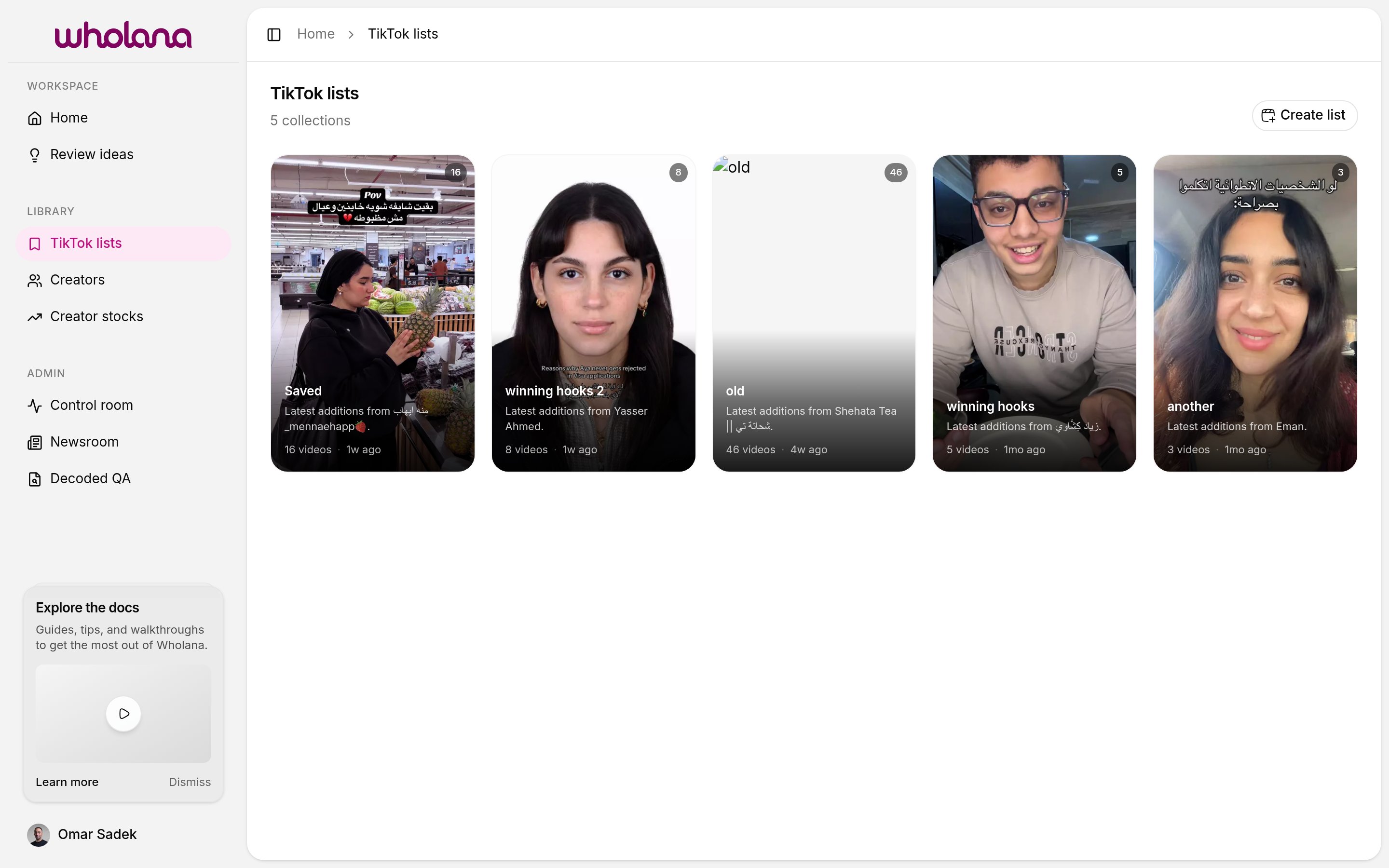
A TikTok list is a named container of saved videos. Lists are how you organize videos by theme, format, campaign, or any structure that fits how you work — without committing to writing a note on each one.
Open **TikTok lists** in the Library section of the sidebar (or visit `/lists`) to see all your lists.
 ## Lists vs ideas
Lists are not the same thing as [saved ideas](/features/saved-ideas). The difference matters:
* **A list** holds videos, grouped by theme. No note. Created by clicking the bookmark icon on a card.
* **An idea** is a single video plus a note. Created from the video's detail view.
Use lists for fast organizational capture during a scan session. Use ideas when you want to write down what makes a video work. A video can live in both — they're independent.
## Saving a video to a list
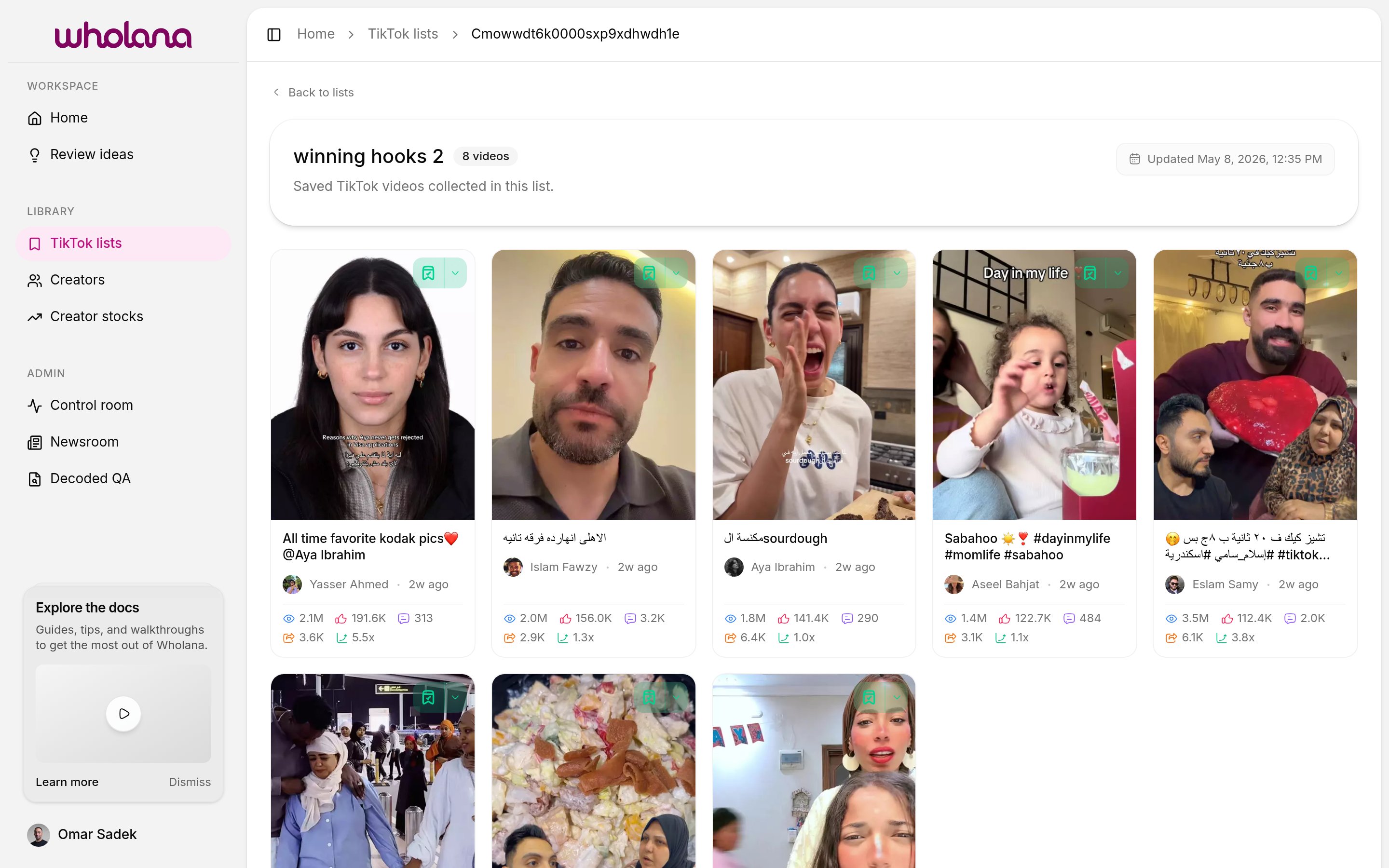
Every card in the [Explore feed](/features/explore-feed) and on a [creator's](/features/creators) page has a **bookmark icon** in the upper right. Two affordances:
* **Click the bookmark icon** — saves the video to your most recently used list. Fast path.
* **Click the dropdown chevron** next to it — opens a menu of all your lists. Pick another list, or create a new one.
The "last list" behavior means a focused session usually only needs the bookmark click. Switch lists with the chevron when you need to.
## Naming lists
Lists are flexible. Common patterns:
* **By format** — `talking-head hooks`, `POV intros`, `text-on-screen openers`
* **By niche question** — `what's working for small accounts`, `viral skincare hooks Q2`
* **By campaign** — one list per active content sprint
* **By client** — one list per project, plus a separate reference list
Each list shows a cover image (drawn from one of its videos), a name, an optional description, a video count, and the last-added date.
## Lists vs ideas
Lists are not the same thing as [saved ideas](/features/saved-ideas). The difference matters:
* **A list** holds videos, grouped by theme. No note. Created by clicking the bookmark icon on a card.
* **An idea** is a single video plus a note. Created from the video's detail view.
Use lists for fast organizational capture during a scan session. Use ideas when you want to write down what makes a video work. A video can live in both — they're independent.
## Saving a video to a list
Every card in the [Explore feed](/features/explore-feed) and on a [creator's](/features/creators) page has a **bookmark icon** in the upper right. Two affordances:
* **Click the bookmark icon** — saves the video to your most recently used list. Fast path.
* **Click the dropdown chevron** next to it — opens a menu of all your lists. Pick another list, or create a new one.
The "last list" behavior means a focused session usually only needs the bookmark click. Switch lists with the chevron when you need to.
## Naming lists
Lists are flexible. Common patterns:
* **By format** — `talking-head hooks`, `POV intros`, `text-on-screen openers`
* **By niche question** — `what's working for small accounts`, `viral skincare hooks Q2`
* **By campaign** — one list per active content sprint
* **By client** — one list per project, plus a separate reference list
Each list shows a cover image (drawn from one of its videos), a name, an optional description, a video count, and the last-added date.
 If a video is worth more than a quick bookmark, open it and save it as an [idea](/features/saved-ideas) instead — or do both. The bookmark stores the video; the idea stores your thinking.
## Related
* [Explore feed](/features/explore-feed) — where you save from
* [Saved ideas](/features/saved-ideas) — the deeper, note-attached save mechanism
* [Creators](/features/creators) — track creators whose videos you keep saving
If a video is worth more than a quick bookmark, open it and save it as an [idea](/features/saved-ideas) instead — or do both. The bookmark stores the video; the idea stores your thinking.
## Related
* [Explore feed](/features/explore-feed) — where you save from
* [Saved ideas](/features/saved-ideas) — the deeper, note-attached save mechanism
* [Creators](/features/creators) — track creators whose videos you keep saving