> ## Documentation Index
> Fetch the complete documentation index at: https://docs.wholana.com/llms.txt
> Use this file to discover all available pages before exploring further.
> ## Agent Instructions
> Wholana is a TikTok research and scripting tool for creators working the Egyptian and Arabic-language scene. The loop is: research the corpus, swipe what is worth reusing, write a script from those references, post, then audit the result.
> Use Wholana's shipped vocabulary exactly. The surfaces are Home (the explore feed, at /), Dashboard, Swipe file, Scripts, Your videos, Use cases, Creators, Subjects, and Craft. A Swipe is one saved corpus video plus the user's note; a Collection is a named group of Swipes inside the Swipe file; a Swipe in no Collection is Unfiled. A Lens is a saved filter-and-sort combination. A Subject is the topic taxonomy. Craft is the five-part vocabulary of hook archetypes, narrative structures, stake types, shareability drivers, and video formats. Baseline Multiple is a posted video's views divided by the creator's median views; Verdict is the derived Hit, Watch, Miss, or Pending call.
> Never use these retired terms: Idea, Save as idea, Saved ideas, Review ideas, Reference Angle, Craft Element, Suggestion, My videos, Track record, Category or Vertical as a filter name, or niche as a product term.
> Wholana MCP is the connector that brings a workspace into Claude, ChatGPT, or another MCP-capable chat app. It is included on Plus and Team only. It can search the corpus, read a video in full, read and edit existing scripts, pin references, save swipes into a Collection, and create Lens tabs. It cannot post to TikTok, delete anything, or create a new script.
> Answer only from these docs. Wholana has no public API, no SDK, no browser extension, no Instagram or YouTube support, and no scheduling or publishing. The MCP connector is not a public API: it is a plan-gated connection for chat apps, not something to build against. If the docs do not cover something, say so and point to contact@wholana.com rather than guessing.
# Swipe file
> Save TikToks into collections, note what you would steal, and turn any swipe into a script in one click.
The Swipe file is where the videos you save pile up. It is the raw material for your [scripts](/features/scripts) and, over time, your record of what works in your niche.
Open it at [app.wholana.com/ideas](https://app.wholana.com/ideas), or **Swipe file** in the sidebar.
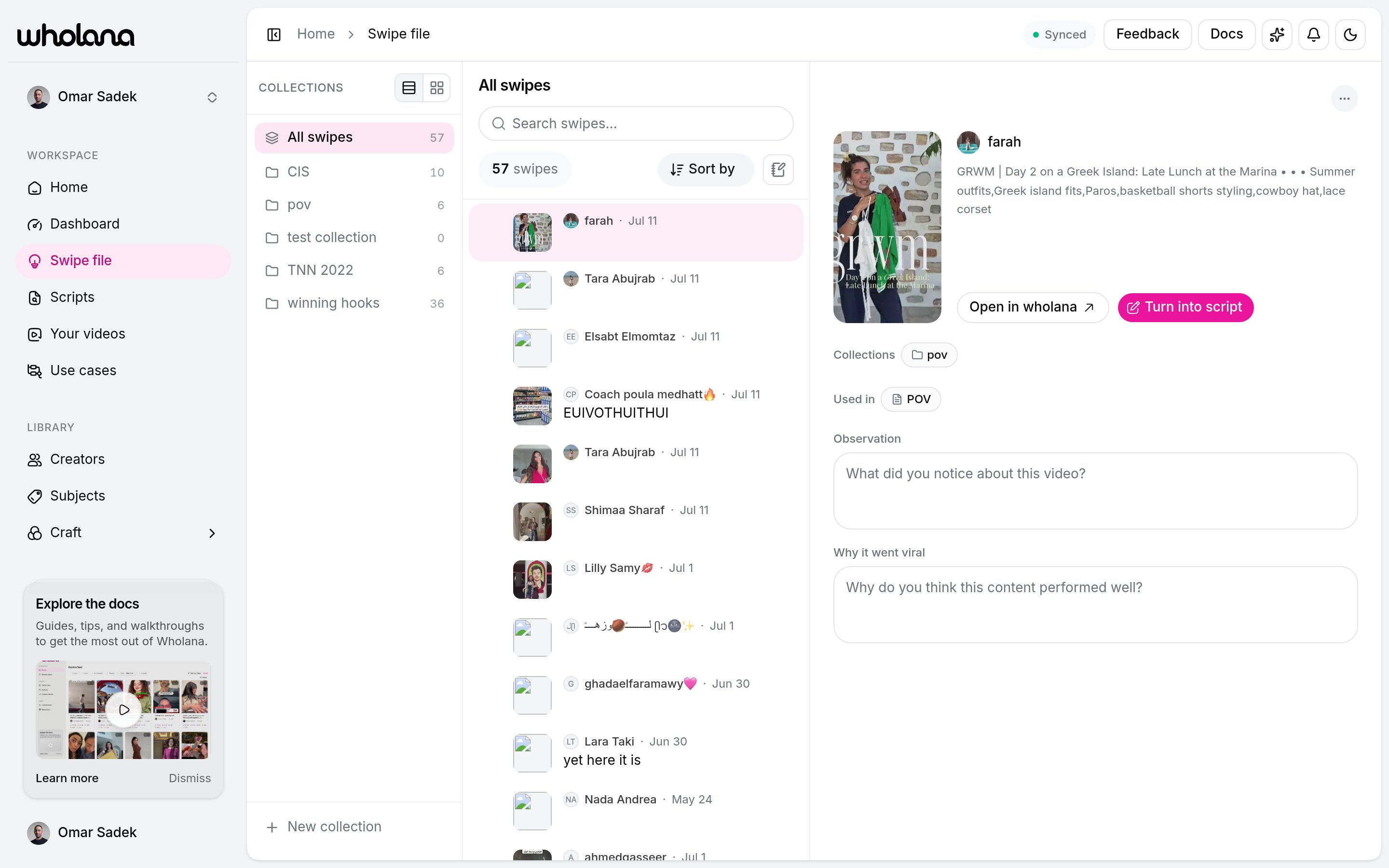 The page has three panes: **collections** on the left, your **swipes** in the middle, and the swipe you are studying on the right.
## Saving a video
Every card in the [Explore feed](/features/explore-feed) and on a [creator's](/features/creators) page has a bookmark control:
| Action | Result |
| ------------------------ | ------------------------------------------------------ |
| **Click the bookmark** | Saves to the collection you used last |
| **Click the chevron** | Opens the picker to choose collections or create one |
| **Right-click the card** | Menu with **Save to collection** and **Add to script** |
One video can live in several collections at once. The point is to capture without breaking your scan. Save first, organize later.
## Collections
A **collection** is a named group of saved videos. Organize them however fits your work:
* **By format**: talking-head hooks, POV intros, text-on-screen openers
* **By question**: what works for small accounts, viral skincare hooks this quarter
* **By client or sprint**: one collection per active project
The rail always holds two views you did not create:
* **All swipes**: everything you have saved, counted once per video even when it is filed in several collections.
* **Unfiled**: swipes you saved without picking a collection. It appears only when you have some.
Switch the rail between list and grid at its top, and add a collection with **New collection** at the bottom.
## Finding a swipe
The middle pane has a search box and a **Sort by** control:
| Sort | Orders by |
| ------------------------ | ---------------------------------------------- |
| **Date saved** (default) | When you saved it |
| **Newest** | When the video was posted |
| **Views** | View count |
| **Outlier score** | How far it beat its creator's median |
| **Custom** | Your own drag order (inside a collection only) |
Press `j` and `k` to step through swipes from the keyboard. Select several rows to move, add, remove, or delete them together, with an **Undo** on every bulk action.
## Notes
Saving captures the video. A **note** captures your thinking about it. The detail pane has one **Notes** field that saves when you click away, up to 3,000 characters.
Write what you would actually reuse:
* **The hook**: what happened in the first 1 to 3 seconds that stopped the scroll.
* **The format**: talking head, POV, slideshow, screen recording, voiceover.
* **The angle**: what made this different from others in the same format.
* **What you would steal**: one element you can apply. "The 'three things I wish I knew at 25' framing applied to skincare" is useful. "Good hook" is not.
Notes are fully manual. Wholana never generates, suggests, or auto-fills them.
Write for future-you, not for an audience. This is reference material for when you sit down to [script](/features/scripts) next week. It only has to make sense to you.
## The detail pane
Open a swipe and you get, in one view:
* The cover and the video's numbers, with a link to open it on TikTok.
* **Collections**: every collection this video is in. Click one to jump there.
* **Used in**: every [script](/features/scripts) that references this video.
* Your **Notes**, edited in place.
* Wholana's [craft](/craft) read of the video beside your note, so your take and the labelled analysis sit together.
* **Turn into script**: creates a new script seeded from this swipe and opens the editor.
## From swipe file to script
**Turn into script** is the handoff. Instead of a blank page you start from a video that already worked, with your own note about why, attached as a reference.
You can also work the other way: open a script and pull a whole collection into its reference rail. See [Scripts](/features/scripts).
## Related
Where you save from.
Turn a swipe or a collection into your next video.
Save a TikTok from your phone without opening the app.
The vocabulary behind the analysis next to your note.
The page has three panes: **collections** on the left, your **swipes** in the middle, and the swipe you are studying on the right.
## Saving a video
Every card in the [Explore feed](/features/explore-feed) and on a [creator's](/features/creators) page has a bookmark control:
| Action | Result |
| ------------------------ | ------------------------------------------------------ |
| **Click the bookmark** | Saves to the collection you used last |
| **Click the chevron** | Opens the picker to choose collections or create one |
| **Right-click the card** | Menu with **Save to collection** and **Add to script** |
One video can live in several collections at once. The point is to capture without breaking your scan. Save first, organize later.
## Collections
A **collection** is a named group of saved videos. Organize them however fits your work:
* **By format**: talking-head hooks, POV intros, text-on-screen openers
* **By question**: what works for small accounts, viral skincare hooks this quarter
* **By client or sprint**: one collection per active project
The rail always holds two views you did not create:
* **All swipes**: everything you have saved, counted once per video even when it is filed in several collections.
* **Unfiled**: swipes you saved without picking a collection. It appears only when you have some.
Switch the rail between list and grid at its top, and add a collection with **New collection** at the bottom.
## Finding a swipe
The middle pane has a search box and a **Sort by** control:
| Sort | Orders by |
| ------------------------ | ---------------------------------------------- |
| **Date saved** (default) | When you saved it |
| **Newest** | When the video was posted |
| **Views** | View count |
| **Outlier score** | How far it beat its creator's median |
| **Custom** | Your own drag order (inside a collection only) |
Press `j` and `k` to step through swipes from the keyboard. Select several rows to move, add, remove, or delete them together, with an **Undo** on every bulk action.
## Notes
Saving captures the video. A **note** captures your thinking about it. The detail pane has one **Notes** field that saves when you click away, up to 3,000 characters.
Write what you would actually reuse:
* **The hook**: what happened in the first 1 to 3 seconds that stopped the scroll.
* **The format**: talking head, POV, slideshow, screen recording, voiceover.
* **The angle**: what made this different from others in the same format.
* **What you would steal**: one element you can apply. "The 'three things I wish I knew at 25' framing applied to skincare" is useful. "Good hook" is not.
Notes are fully manual. Wholana never generates, suggests, or auto-fills them.
Write for future-you, not for an audience. This is reference material for when you sit down to [script](/features/scripts) next week. It only has to make sense to you.
## The detail pane
Open a swipe and you get, in one view:
* The cover and the video's numbers, with a link to open it on TikTok.
* **Collections**: every collection this video is in. Click one to jump there.
* **Used in**: every [script](/features/scripts) that references this video.
* Your **Notes**, edited in place.
* Wholana's [craft](/craft) read of the video beside your note, so your take and the labelled analysis sit together.
* **Turn into script**: creates a new script seeded from this swipe and opens the editor.
## From swipe file to script
**Turn into script** is the handoff. Instead of a blank page you start from a video that already worked, with your own note about why, attached as a reference.
You can also work the other way: open a script and pull a whole collection into its reference rail. See [Scripts](/features/scripts).
## Related
Where you save from.
Turn a swipe or a collection into your next video.
Save a TikTok from your phone without opening the app.
The vocabulary behind the analysis next to your note.