> ## Documentation Index
> Fetch the complete documentation index at: https://docs.wholana.com/llms.txt
> Use this file to discover all available pages before exploring further.
# Explore feed
> Wholana's primary discovery surface: filter, sort, and the Outlier score.
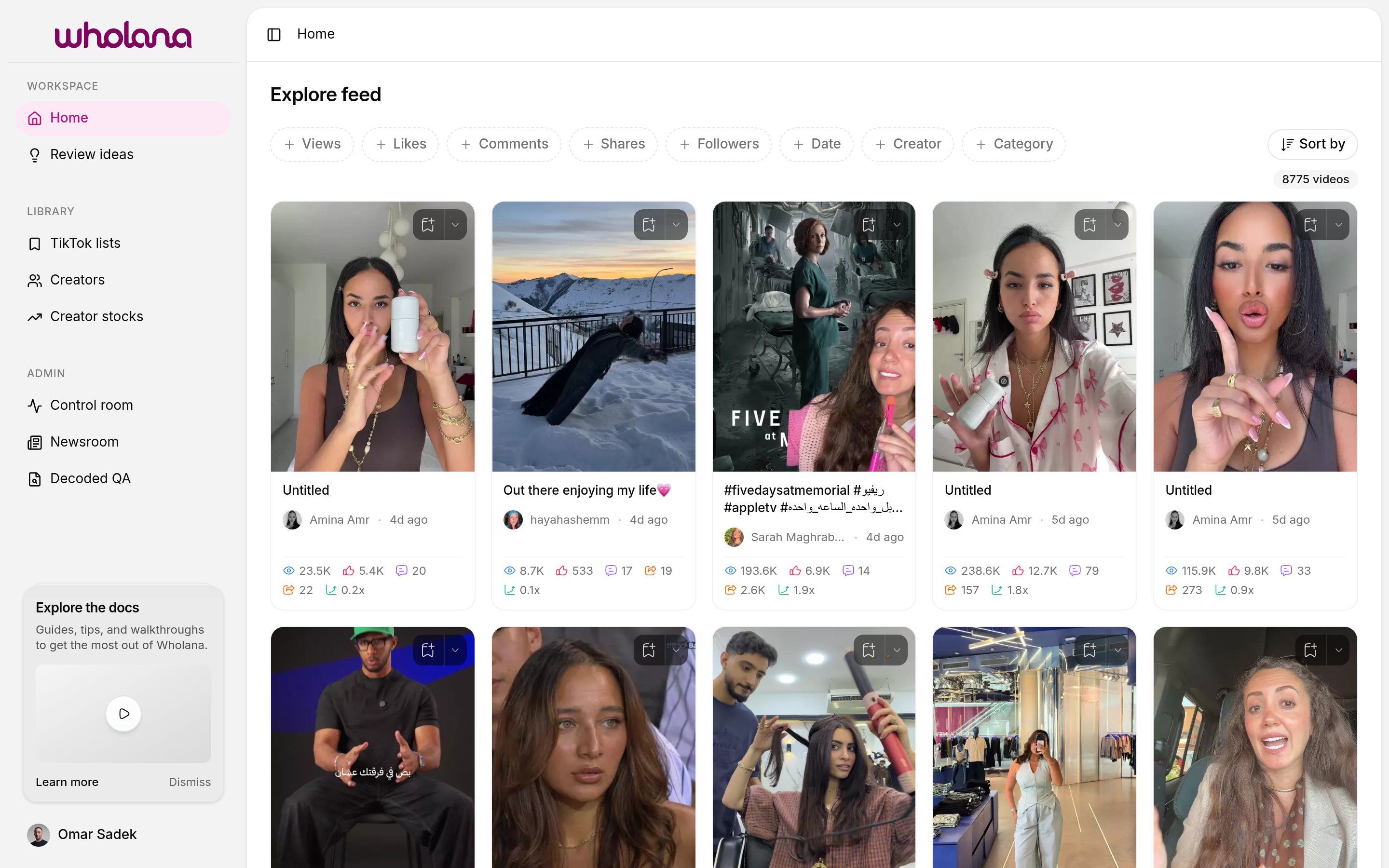
The Explore feed is where every research session starts. It shows TikTok videos from Wholana's scraped dataset as a grid of cards, with two controls that do most of the work: **filters** narrow what's in the feed, and **sort** decides the order.
Open **Home** in the sidebar to get to it (it lives at `/`).
 ## Filters
Filters scope the feed to the slice of TikTok you care about. Click the `+` chip next to a filter name to set it.
## Filters
Filters scope the feed to the slice of TikTok you care about. Click the `+` chip next to a filter name to set it.
 | Filter | What it narrows to |
| ------------- | -------------------------------------------------- |
| **Views** | Videos within a view-count range |
| **Likes** | Videos within a like-count range |
| **Comments** | Videos within a comment-count range |
| **Shares** | Videos within a share-count range |
| **Followers** | Videos from creators within a follower-count range |
| **Date** | Videos posted in a date range |
| **Creator** | Videos from a specific creator |
| **Category** | Videos in a specific subject category |
Filters compose. Setting both **Followers** at 10k–500k and **Category** to your subject scopes the feed to mid-sized creators in your niche.
The video count below "Sort by" updates as you filter, so you can see how aggressive your scope is.
Wholana has no "niche" picker. You express your niche by composing filters. Save your filter pattern in your head (or in a list name) — it's how you return to the same scope tomorrow.
## Sort
The **Sort by** control orders the filtered feed. Options:
* **Outlier score** (default for finding what's worth studying)
* **Date** (most recent first)
* **Views**
* **Likes**
* **Comments**
* **Shares**
Different sorts answer different questions. Sort by **Date** when you want to see what's new in your niche. Sort by **Views** to see what's already big. Sort by **Outlier score** to find videos performing far above the creator's own baseline — usually the most interesting signal for a research session.
## Outlier score
Every card shows a multiplier like `0.2x`, `1.0x`, or `1.9x`. That is the **Outlier score**:
```
Outlier score = video views / median of that creator's views
```
What the values mean:
* `1.0x` — the video matches the creator's typical performance
* `>1.0x` — a breakout, relative to that creator
* `<1.0x` — underperforming, relative to that creator
The score is per-creator, so a 100k-view video from a creator who normally gets 200k will score `0.5x`, while a 30k-view video from a creator who normally gets 5k will score `6x`. The second one is usually the more interesting signal — a sudden hit from someone who doesn't normally get them.
Sorting by Outlier score surfaces these breakouts regardless of absolute size, which is the point.
## Working a session
Add filters until the feed is narrow enough to skim — usually under a few hundred videos.
Pick the sort that matches what you're looking for. Outlier score is the default; switch when you have a different question.
When a video catches you, click the bookmark icon on the card to save it to your last-used [list](/features/tiktok-lists). Use the dropdown chevron next to it to pick a different list. Don't break flow.
For videos worth deeper study, click the card to open its detail view and save it as an [idea](/features/saved-ideas) with a note attached. The two save mechanisms are independent — a video can be both, just one, or neither.
Explore feed data is scraped and refreshes daily. It is not a real-time feed.
| Filter | What it narrows to |
| ------------- | -------------------------------------------------- |
| **Views** | Videos within a view-count range |
| **Likes** | Videos within a like-count range |
| **Comments** | Videos within a comment-count range |
| **Shares** | Videos within a share-count range |
| **Followers** | Videos from creators within a follower-count range |
| **Date** | Videos posted in a date range |
| **Creator** | Videos from a specific creator |
| **Category** | Videos in a specific subject category |
Filters compose. Setting both **Followers** at 10k–500k and **Category** to your subject scopes the feed to mid-sized creators in your niche.
The video count below "Sort by" updates as you filter, so you can see how aggressive your scope is.
Wholana has no "niche" picker. You express your niche by composing filters. Save your filter pattern in your head (or in a list name) — it's how you return to the same scope tomorrow.
## Sort
The **Sort by** control orders the filtered feed. Options:
* **Outlier score** (default for finding what's worth studying)
* **Date** (most recent first)
* **Views**
* **Likes**
* **Comments**
* **Shares**
Different sorts answer different questions. Sort by **Date** when you want to see what's new in your niche. Sort by **Views** to see what's already big. Sort by **Outlier score** to find videos performing far above the creator's own baseline — usually the most interesting signal for a research session.
## Outlier score
Every card shows a multiplier like `0.2x`, `1.0x`, or `1.9x`. That is the **Outlier score**:
```
Outlier score = video views / median of that creator's views
```
What the values mean:
* `1.0x` — the video matches the creator's typical performance
* `>1.0x` — a breakout, relative to that creator
* `<1.0x` — underperforming, relative to that creator
The score is per-creator, so a 100k-view video from a creator who normally gets 200k will score `0.5x`, while a 30k-view video from a creator who normally gets 5k will score `6x`. The second one is usually the more interesting signal — a sudden hit from someone who doesn't normally get them.
Sorting by Outlier score surfaces these breakouts regardless of absolute size, which is the point.
## Working a session
Add filters until the feed is narrow enough to skim — usually under a few hundred videos.
Pick the sort that matches what you're looking for. Outlier score is the default; switch when you have a different question.
When a video catches you, click the bookmark icon on the card to save it to your last-used [list](/features/tiktok-lists). Use the dropdown chevron next to it to pick a different list. Don't break flow.
For videos worth deeper study, click the card to open its detail view and save it as an [idea](/features/saved-ideas) with a note attached. The two save mechanisms are independent — a video can be both, just one, or neither.
Explore feed data is scraped and refreshes daily. It is not a real-time feed.