> ## Documentation Index
> Fetch the complete documentation index at: https://docs.wholana.com/llms.txt
> Use this file to discover all available pages before exploring further.
> ## Agent Instructions
> Wholana is a TikTok research and scripting tool for creators working the Egyptian and Arabic-language scene. The loop is: research the corpus, swipe what is worth reusing, write a script from those references, post, then audit the result.
> Use Wholana's shipped vocabulary exactly. The surfaces are Home (the explore feed, at /), Dashboard, Swipe file, Scripts, Your videos, Use cases, Creators, Subjects, and Craft. A Swipe is one saved corpus video plus the user's note; a Collection is a named group of Swipes inside the Swipe file; a Swipe in no Collection is Unfiled. A Lens is a saved filter-and-sort combination. A Subject is the topic taxonomy. Craft is the five-part vocabulary of hook archetypes, narrative structures, stake types, shareability drivers, and video formats. Baseline Multiple is a posted video's views divided by the creator's median views; Verdict is the derived Hit, Watch, Miss, or Pending call.
> Never use these retired terms: Idea, Save as idea, Saved ideas, Review ideas, Reference Angle, Craft Element, Suggestion, My videos, Track record, Category or Vertical as a filter name, or niche as a product term.
> Wholana MCP is the connector that brings a workspace into Claude, ChatGPT, or another MCP-capable chat app. It is included on Plus and Team only. It can search the corpus, read a video in full, read and edit existing scripts, pin references, save swipes into a Collection, and create Lens tabs. It cannot post to TikTok, delete anything, or create a new script.
> Answer only from these docs. Wholana has no public API, no SDK, no browser extension, no Instagram or YouTube support, and no scheduling or publishing. The MCP connector is not a public API: it is a plan-gated connection for chat apps, not something to build against. If the docs do not cover something, say so and point to contact@wholana.com rather than guessing.
# Dashboard
> One page for how your own posting is going, what's breaking out in your niche right now, and every saved Lens.
The Dashboard is your home base between research sessions. It answers three questions: how your posting is going, what's worth copying right now, and where you left your saved scopes.
Open it at [app.wholana.com/dashboard](https://app.wholana.com/dashboard).
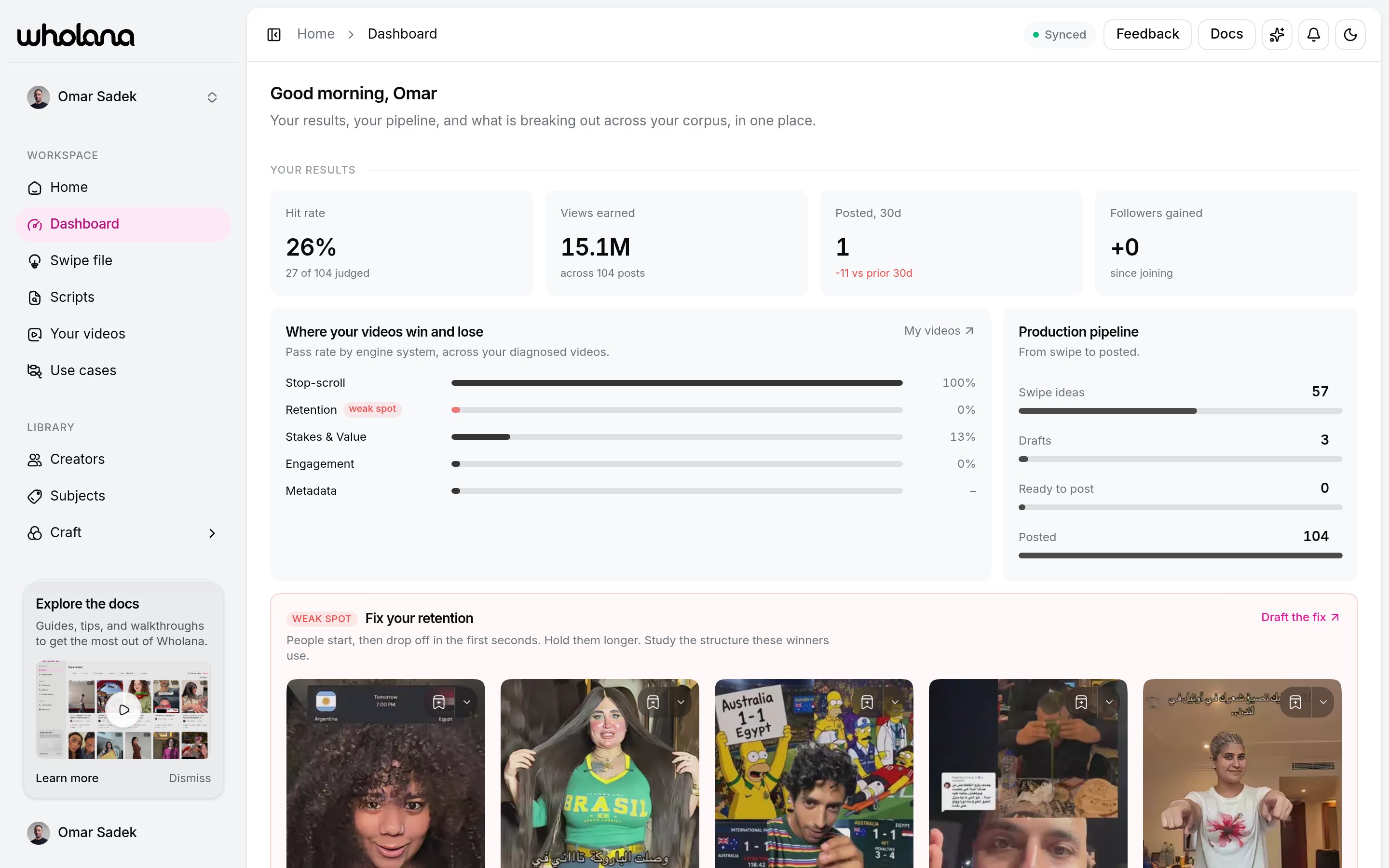 The page has three clusters, in this order: **Your results**, **The market**, **Your lenses**.
## Your results
How your own account is doing, and the next move it implies. This cluster fills in once you connect your TikTok handle in [Settings → Workspace](/features/workspaces) and have posts audited in [Your videos](/features/your-videos).
**Hero stats** is one row of four:
| Stat | What it means |
| -------------------- | -------------------------------------------------------------------- |
| **Hit rate** | Share of your judged posts that hit (2x your median views or better) |
| **Views earned** | Total views across everything you have posted |
| **Posted, 30d** | Posts in the last 30 days, with the change against the prior 30 |
| **Followers gained** | Follower growth since you joined, with a sparkline |
Below the stats:
* **Where your videos win and lose**: your pass rate across the five engine systems (Stop-scroll, Retention, Stakes & Value, Engagement, Metadata), with your worst system tagged **weak spot** and a one-line prescription under it. See [Craft](/craft) for what each system means. This stays empty until you diagnose at least one posted video.
* **Production pipeline**: a funnel from **Swipe ideas** to **Drafts** to **Ready to post** to **Posted**, with the conversion between stages. It shows where work is piling up. Each stage links to its surface.
* **Growth since joining**: a follower-growth chart over your time on Wholana.
A pipeline that is heavy on Swipe ideas and light on Drafts means you are researching more than you are making. That is the most common shape, and the fix is to open one collection in [Scripts](/features/scripts) rather than scan more.
## The market
What's worth copying right now, drawn from the corpus.
* **Breaking out now**: the highest outlier scores from the last 14 days. Toggle between **Your niche** and **Global** (the whole tracked corpus). The **Your niche** tab appears once Wholana has detected your niche from your posts.
* **Formats winning right now**: the hook archetypes appearing most among breakouts from the last 30 days. Each row links to its [craft](/craft) page.
* **Rising in your niche**: a creator leaderboard scoped to the subjects you post about. Without a detected niche it reads **Rising across the corpus**.
## Your lenses
Every [Lens](/features/explore-feed#lenses) you have saved, on both Explore and Creators, with the surface it belongs to. Rename, open, or delete one here.
Each Lens also has an **Alerts** toggle: turn it on and Wholana notifies you when new videos enter that scope. It is the only setting a Lens carries.
**Changed recently:** a Lens used to be described as taking a role such as a watchlist or a cohort. No role concept ships. Alerts, rename, and delete are the whole manager. Your saved filter sets are unchanged.
## Before you connect a handle
Research, saving, and scripting all work without a connected TikTok handle. **Your results** is the only cluster that stays empty, because it measures your own posts. Connect your handle in [Settings → Workspace](/features/workspaces) to light it up.
## Related
Where verdicts and diagnoses come from.
Build the Lenses this page manages.
The five systems behind the scorecard.
Connect the TikTok handle that powers this page.
The page has three clusters, in this order: **Your results**, **The market**, **Your lenses**.
## Your results
How your own account is doing, and the next move it implies. This cluster fills in once you connect your TikTok handle in [Settings → Workspace](/features/workspaces) and have posts audited in [Your videos](/features/your-videos).
**Hero stats** is one row of four:
| Stat | What it means |
| -------------------- | -------------------------------------------------------------------- |
| **Hit rate** | Share of your judged posts that hit (2x your median views or better) |
| **Views earned** | Total views across everything you have posted |
| **Posted, 30d** | Posts in the last 30 days, with the change against the prior 30 |
| **Followers gained** | Follower growth since you joined, with a sparkline |
Below the stats:
* **Where your videos win and lose**: your pass rate across the five engine systems (Stop-scroll, Retention, Stakes & Value, Engagement, Metadata), with your worst system tagged **weak spot** and a one-line prescription under it. See [Craft](/craft) for what each system means. This stays empty until you diagnose at least one posted video.
* **Production pipeline**: a funnel from **Swipe ideas** to **Drafts** to **Ready to post** to **Posted**, with the conversion between stages. It shows where work is piling up. Each stage links to its surface.
* **Growth since joining**: a follower-growth chart over your time on Wholana.
A pipeline that is heavy on Swipe ideas and light on Drafts means you are researching more than you are making. That is the most common shape, and the fix is to open one collection in [Scripts](/features/scripts) rather than scan more.
## The market
What's worth copying right now, drawn from the corpus.
* **Breaking out now**: the highest outlier scores from the last 14 days. Toggle between **Your niche** and **Global** (the whole tracked corpus). The **Your niche** tab appears once Wholana has detected your niche from your posts.
* **Formats winning right now**: the hook archetypes appearing most among breakouts from the last 30 days. Each row links to its [craft](/craft) page.
* **Rising in your niche**: a creator leaderboard scoped to the subjects you post about. Without a detected niche it reads **Rising across the corpus**.
## Your lenses
Every [Lens](/features/explore-feed#lenses) you have saved, on both Explore and Creators, with the surface it belongs to. Rename, open, or delete one here.
Each Lens also has an **Alerts** toggle: turn it on and Wholana notifies you when new videos enter that scope. It is the only setting a Lens carries.
**Changed recently:** a Lens used to be described as taking a role such as a watchlist or a cohort. No role concept ships. Alerts, rename, and delete are the whole manager. Your saved filter sets are unchanged.
## Before you connect a handle
Research, saving, and scripting all work without a connected TikTok handle. **Your results** is the only cluster that stays empty, because it measures your own posts. Connect your handle in [Settings → Workspace](/features/workspaces) to light it up.
## Related
Where verdicts and diagnoses come from.
Build the Lenses this page manages.
The five systems behind the scorecard.
Connect the TikTok handle that powers this page.